20+ Stunning Blogger Templates – What a Strong Design?

Time to leak some Professional Stunning Blogger Templates.Blogging is a famous publishing service bought by Google in 2003.Actually Blogs are hosted by Google at the Sub-domain of Blogspot.com. These days blogging is a trendy topic,it is because of its beautiful and creative way of Publishing Services. Blogger Provides a navigable Dashboard to their users which is as easy as eating.It also Provides up-to 1 GB space for hosting images Through Picasa. However we will Come to the main point i.e whenever One is Creating a Blog–its very easy but Now How to run and Maintain it?Because you have to Compete with thousand of other Bloggers.In this regards you must have a Stunning Blog which can easily attract the visitors,also your Blog must have a beautiful outlook i.e How its Template Should be? Here we have Collected the 20+ Stunning Blogger Templates having a Strong Design.


20+ Stunning Blogger Templates – What a Strong Design?

All these templates have a Strong Design along with other awesome features i.e Ads Ready,SEO Ready,Fixed Width,Stylish,Elegant,Stunning,Professional Look,and Work with all type of Browsers such as Google Chrome,Mozilla or Safari etc.You Can Download it free from Our Blog.


WebMag Professional Blogger Template

GameMix Blogger Template (Free)

gamemix

BResponsive Blogger Template


Helix Blogger Template


The Firestorm – Personal Blogging and Photography

firestorm best blogger template

MBT(My Blogger Tricks) Blogger Template V 2.0 

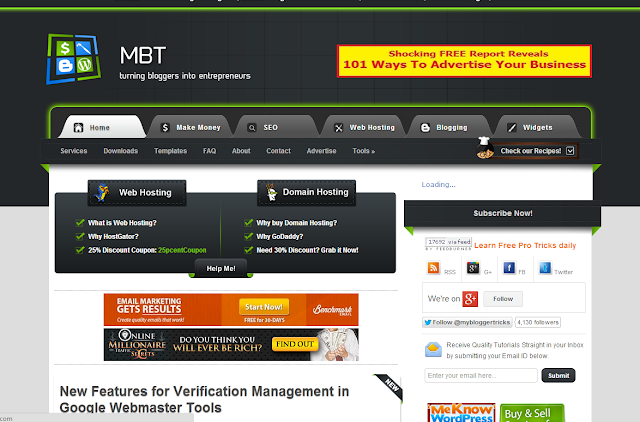
MBT Blogger template V 2.0 is a professional template Designed by Muhammad Mustafa (MBT Owner).This Template is a fantastic template for Blogging,and tech blogs.This template has 3 columns layout along with beautiful drop down menu.This Template is SEO Optimized template.MBT Blogger template V 2.0 is ads ready template.It has Automatic Read-more option,author box and social share widgets.This template works with all type of browsers such as Google Chrome,Mozilla and Internet Explorer etc.MBT Blogger template is a responsive Template with beautiful black color background which makes it more awesome template.
Template By MBT
mbt-blogger-template-v-2

Johny Darkfire Blogger Template

johny dark

ProGray Blogger Template


Sevida – Responsive Magazine Blogger Template

Sevida Blogger Templates

Blogism Blogger Template 2013

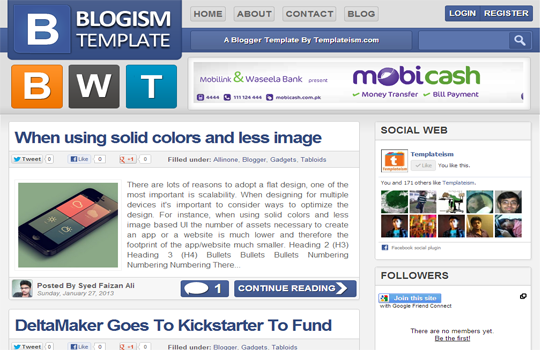
Blogism Blogger Template is design by a young Blogger Syed Faizan Ali (MBL Owner) from Pakistan,This Template is specially designed for Tech Bloggers .Blogism is ads ready template,it has One right sidebar and beautiful share buttons below the posts. Blogism Blogger Template has awesome header which makes it more beautiful Template.It has 2 columns layout.Blogism template has read-more option,it has author avatar with each post.This Template works with all type of Browsers such as Google Chrome,Mozilla Firefox and Internet Explorer etc.
Template By Templatism
Blogism Blogger Template Large Layout


Big News Blogger Theme V2

MainPhoto Responsive Blogger Template

Lord HTML Blogger Template

Lord HTML Blogger Template is a new free Blogger Template design by Durai Sankar,its author is LORDHTML. Actually Lord HTML Blogger template is a clean and responsive Blogger template,it is also for Blogging and Tech blogs.However you can use it for any type of Blog.This template is ads,and SEO Optimized Template.It has no Footer,however it has one beautiful right sidebar along-with drop down menu which makes it attractive template.Moreover it has a search bar,page navigation widgets,social buttons,readmore option,and HTML Code View.This template works with all type of Browsers such as Google Chrome etc.You can Download it free from our Blog.
Template design by Durai Sankar

Labnol Blogger Template

Labnol Blogger Template is a Professional Blogger Template design by Labnol.Org.This template is designed by the Pro Blogger Of India,this template has many features such as Simple and Clean design,it has One right sidebar,This template is Purely SEO Optimized.The Loading Speed of this template is very fast.Labnol Blogger Template has white background which makes it more attractive template.However it works with all type of browsers such as Internet Explorer etc.You Can easily Download this template from Our Blog.
Template design by Labnol
labnol blogger template

Sensational Blogger Template

Spice Up Your Blog Template

The last and most beautiful Blogger Template is Spice up Blogger Template which is designed by Durai Sankar.This Template is ads Ready template,it has awesome ads options.This template has 3 columns layout.It has ready Brown Color Drop Down menu.This template has Subscription widget and Own Fonts.This template has One Right Sidebar along with beautiful header which increase its beauty.This Template has ready Social Buttons which will surely help you to get more Facebook Page Likes,Twitter Tweets etc.However this template works with all type of browsers.You Can Download it free from Our Blog.
Designed by Durai Sankar.
Spice-up-your-blog-Blogger-Template


Metro BTK V2 – Impressive Blogger Template

metro BTK

ProVouge Blogger Template

PreVogue Blogger Template 2013


Yaminth Blogger Template

Yaminth Blogger Template 2013


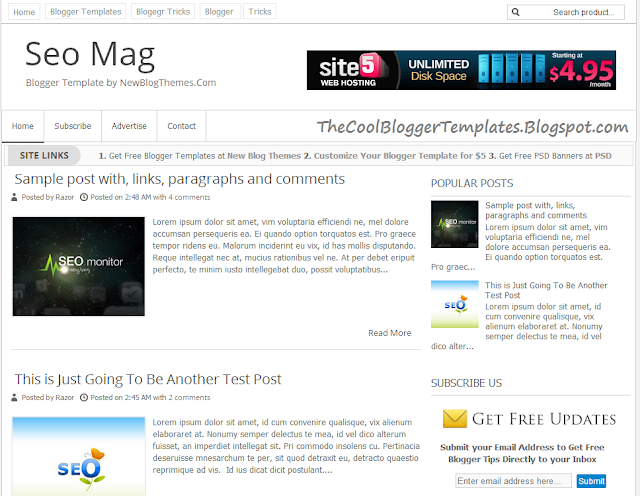
SEOMAG Blogger Template

SEO Mag Blogger Template


Ajaxify Blogger Template


Metro Minimalist Blogger Template

Live Demo DOWNLOAD
20+ Stunning Blogger Templates – What a Strong Design?
Last Reviewed by Iftikhar uddinon June 24 2013
Rating: 5

Add Divider(line) Between Posts in Blogger

Another interesting Hack for Blogger is How To Add Divider Between The Blogger Posts?Adding Divider between the posts is nothing else it will just add an image which will clarify the posts i.e One can easily navigate any post.Actually by default Blogger template has a Line which divides the post but isn't that Looking Bore? Of Course its Boring then don't waste your time,this is the time to make your Blog Creative and Attractive.

First Of all you have to find a Picture which you want to use as a divider e.g in Our Case we have the below image which we will use to add divider b/w the Posts.
You can host your Divider image in any hosting such as tinpic or Photo Bucket etc.

How To Add Divider(line) Between Posts in Blogger

  • Go To Blogger Dashboard >> Template >> Edit HTML
  • Search for this Code
.post { margin:.5em 0 1.5em; border-bottom:1px dotted $bordercolor; padding-bottom:1.5em; }

  • Now Replace the Above Code with The Below Script and if you are interested in Changing the divider image just change the URL and Do This Step

.post {
background: url(http://i36.tinypic.com/xqid55.jpg);
background-repeat: no-repeat;
background-position: bottom center;
margin:.5em 0 1.5em;
border-bottom:0px dotted $bordercolor;
padding-bottom:3.6em;
}

  •  Replace the Red URL mentioned with your Own Divider image url
  • If you want to Change "Padding-Bottom" increase or decrease the value in Black Bold Script

2nd Method For Adding Divider Between Posts in Blogger

If The Above Method is not working in your Template,then you have to use this method which is very easy !
  • Go To Blogger Dashboard
  • Click on Template
  • Edit HTML
  • Now Search for the below Script
<div class='post-footer-line post-footer-line-3'/>

  • Now Copy the below Script and Add it below the above Script
<center><img height='30' src='divider image url'/></center> 
Tip:- If you want to increase the Divider height Change 30 to the Desired value,and Add Divider image url in the script and that's it!

So What's Up:- This was an awesome trick,it is ideal for bloggers to add this divider image between the posts.It will help their visitors to easily navigate the blogging contents.Share your ideas with us , stay Blessed Happy Blogging!

Top 10 Eye Catching Facebook Timeline Covers

Facebook Timeline Covers is a trendy topic these days.Every One is sharing a flood of covers for timeline,even different kind of websites and blogs have been created by this Topic.The Thing is How They Share,they Share beautiful and Awesome Covers but not All.They may share some beautiful Covers for Downloading but the thing is where to get best and attractive i.e Top 10 Eye Catching Facebook Timeline Covers.Now if you  are also searching for these covers then you are at the right place.Here we have collect the Top 10 which include the latest Eye Catching Facebook Timeline Covers.

Why People interested in Facebook Timeline Covers?

It's a Common Question in every One Mind,why People Like these Covers Photos.Actually as Facebook is Young and providing all the latest luxuries to the teenagers and to all age People.Every One wants to keep their social status higher,in this regards they make their Profile Picture,Timeline Photo and Name etc Stylish and attractive to impress their friends,followers and fans.

2 Toys Cute Facebook Timeline Cover Photo


toys-love-Facebook-Timeline-Cover

Mathematician Facebook Time Line Cover Photo

facebook-Cover-Photo

Hate and Love Mix Facebook timeline Cover Photo

i-hate-you-love-you-fb-cover-photo

Hackers Facebook Time Line Cover Photo

Hackers Facebook Time Line Cover Photo

Loading Facebook Timeline Cover Photo

Loading Facebook Timeline Cover Photo


Facebook King-Facebook Timeline Cover Photo

Facebook King-Facebook Timeline Cover Photo


Thats Facebook Timeline Cover Photo

Thats Facebook Timeline Cover Photo

Joker-Facebook Timeline Cover Photo

Joker-Facebook Timeline Cover Photo

Thats-Facebook Timeline Cover Photo

Thats-Facebook Timeline Cover Photo

Funny Facebook Timeline Cover Photo

Funny Facebook Timeline Cover Photo

Some Extra Attractive Covers

spider-man-fb-cover-timeline

lol-fb-timeline-cover

Cars-Facebook-Timeline-Cover

best-fb-timeline-cover-photo

Eye-Catching-view-FB-Timeline-Cover
Top 10 Eye Catching Facebook Timeline Covers
Last Reviewed by Iftikhar uddinon June 24 2013
Rating: 5

Stylish Sliding Up Image Description Widget For Blogger

We Got a new Widget i.e Stylish Sliding Up Image Description Widget For Blogger.Let's Play with this widget,this widget enable us to add description below image but How? Its not a unique to add description Below image ? Of-course but in this widget the description will be shown when One hover the mouse over the image and the description will be clearly seen.Does it make Sense,its looking Sound Good.With the help of CSS and HTML this widget can be added easily to Blog.

How to Add Stylish Sliding Up Image Description Widget To Blogger

  • Visit Blogger.com
  • Go To Dashboard
  • Now Click On Layout 
  • And Then Click On Add a Gadget
  • A Box will Pop-up
  • Select HTML/JavaScript
  • Now Copy the below Script and made the Necessary changes which is mentioned clearly 
  • Paste it there and that's it !
<style>.image-box {  width:280px;height:280px;overflow:hidden;background-color:white;  border:1px solid #ccc;float:left;margin:1px 1px;  font:normal normal 12px/1.4 Segoe,"Segoe UI",Arial,Sans-Serif;  color:#333;}.image-container,.image-details {height:280px;border:5px solid white;background-color:#ffc;  transition:margin-top .4s ease-out .4s;}.image-container img {  width:280px;height:280px;padding:0 0;margin:0 0;border:none;outline:none;max-width:none;  max-height:none;  background-color:black;}.image-details h4,.image-details p {  margin:0 0 .2em;padding:0 0;height:70px;}.image-details h4 {  font-size:120%;height:auto;}.image-details .details {  padding:10px 12px;overflow:hidden;}
.image-details .more {  color:white;text-decoration:none;display:block;  text-align:center;font-weight:bold;background-color:#f9a;height:26px;line-height:26px;margin:10px 0 0;}
.image-box:hover {border-color:#bbb; width:280px;  height:280px;}.image-box:hover .image-container {margin-top:-160px}.image-details .more:hover {background-color:black}</style>
<div class="image-box-wrapper" id="image-box-wrapper"> <div class="image-box">  <div class="image-container">   <img width="280" height="280" src="https://blogger.googleusercontent.com/img/b/R29vZ2xl/AVvXsEgZFwGRtbKEmOn8S6DbiIk1gz7OoYe7ZKU8jB64bXaHy7Eb7kjYWsYux0qVCSXOLsnwOpTBkgr5FbRS8cEIwvqdonqQNFLzNiZ54pglIL0Rg6oCjXL0ZKT8hHd9AVpR7Lz66sAgdj6YGLXU/s640/a.aaa-Face-painted-by-hand.jpg" alt="Just">  </div>  <div class="image-details">   <div class="details">    <h4>Lorem Ipsum</h4>    <p>Lorem ipsum dolor sit amet, consectetuer adipiscing elit, sed diam nonummy..</p>    <p><a class="more" href="Blog Post Link ">See More</a></p>   </div>  </div> </div> 
 <div style="clear:both;"></div>
</div>

  • Save it and You are Done !
  • Stay Blessed Happy BlogginG!