Automatically Publish Blogger Posts To Facebook,Twitter and Other Social Networks

Social Networks is the backbone for your Blog Traffic.Never underestimate the strength of Social Networking Websites,actually every social networking website is getting  million of hits daily,and if you share your blog post/content there,then surely you can get a flood of traffic to your Blog.Now every Blogger is sick of posting his/her blog posts daily to Facebook,Twitter or other social networking sites,but here we have found an awesome trick via which you can Automatically Publish Your Blogger Posts to Facebook,Twitter, or any Other Social networking website.For installing this Service follow the below easy steps.


How To Automatically Publish Blogger Posts To Facebook and Other Social Sites

  • Visit DLVR.it
  • Now Sign up there,by filling the form with required Data
  • After Entering Email and Password , click on Sign Up.
  • Now Go To Your email inbox and Confirm your Email Address
  • Now it will redirect you to another Page where you have to enter your Blog Feed Burner Username 
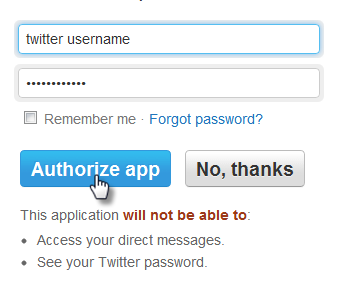
  • Click On Twitter Icon at the right side,Now it will redirect you to twitter account,there enter E-mail and Password and Click on Authorize App
  • Now your Blog Posts will Automatically Publish to your Twitter Account
  • Now For Facebook Click On The Facebook Icon at the right side,it will redirect you to Facebook,there enter your username and password,after that they may ask you about Page username i.e Fan Page
  • Enter that and Save Changes

So What's Up

Automatically Publishing Blogger Posts to Social Networking Sites will certainly help you to generate a flood of traffic to your Blog,as i mentioned never underestimate the Social Websites,because you can get alot of traffic to your Blog,However if you apply this service to your Blog,i am sure you will get high traffic.

Question :- How to Apply this Service for Google +?
Answer :-   Actually Now when you post a Content on your blog,after Publishing Blogger Ask you for sharing that Post to Google + ,means they Provide this feature builtinly.

Top 5 Professional Free WordPress Themes 2013

WordPress; WordPress is a free Blogging Tool,and CMS(Content Management System).WordPress use PHP and MySQL Languages for editing,modifying or installing Plugins.Creating WordPress website is not difficult,but finding a beautiful theme for WordPress Blog is lil bit hard work.So in this regard we have collected Top 5 Professional Free WordPress Themes which will surely solve your Problem of finding and wasting time on Finding Themes for WordPress Blogs.Actually theme is soul of your blog,it will reflect your personality and your blog personality.

Features of Top 5 Professional Free WordPress Themes 2013

  • Professional Look
  • Ads Ready,SEO Ready
  • Right,Left Sidebars
  • Top Navigation menus
  • Simple and Clean
  • Custom Headers 
  • Custom Backgrounds
  • Automatic Feed Links
  • Work With All Browsers i.e Google Chrome, Mozilla and Firefox

Top 5 Professional Free WordPress Themes 2013

Finding Professional Themes for WordPress is very hard,but when Quality is your First Priority,then you have to find the awesome theme for your WordPress Blog.So here is Top 5 Professional Themes,i hope you will found it interesting.

1# Rusty Grunge Professional WordPress Theme


2# CryBook Professional WordPress Theme

CryBook WordPress Themes has 3 Columns Layout,it has 2 right sidebars along with many other widgets.Its look is like Facebook which makes it more attractive Template.
crybook-professional-wordpress-themes


3# Max Professional WordPress Theme

max-professional-wordpress-theme


4# Blog Theme Professional WordPress Theme

blogtheme-professional-wordpress-theme


5# Androida Professional WordPress Theme


So What's Up :- Did You Like These WordPress Themes? Which One was the most Beautiful ? Your Favorite One? Any New Template You Want? Pass your views,and share your ideas with us :) , stay Blessed,Happy Blogging .
Top 5 Professional Free WordPress Themes 2013
Last Reviewed by Iftikhar uddinon June 24 2013
Rating: 5

How To Add Facebook Comment Box To Blogger

Adding Facebook Comment Box To Blogger Blogs is very Old trick,but recently one of our Blog visitors asked for this Comment Box.In this regard here is a Facebook Comment Box,Actually there are many users who don't have Blogger Accounts,therefore they can comment on your blog articles via Facebook Comments Box.Now time to install Facebook Comment Box To Blogger,its installation is very simple,you may have seen many articles in which first you have to create an App in Facebook after that many steps are required,but this article is not as difficult as other articles.

facebook-comment-box


How To Add Facebook Comment Box To Blogger

For installing this widget to Blogger,you just have to copy a code and then add it to Blogger layout Section,follow the below steps.

  • Go To Blogger.com
  • Sign in there
  • And Now Click On Layout 
  • After that Click On Add a Gadget
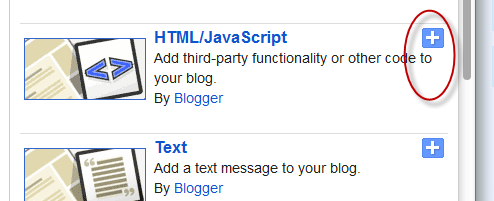
  • A Box will Popup Select "HTML/JavaScript"
  • Now Copy the Below Script and Paste it into the Box
<script>(function(d){
  var js, id = 'facebook-jssdk'; if (d.getElementById(id)) {return;}
  js = d.createElement('script'); js.id = id; js.async = true;
  js.src = "//connect.facebook.net/en_US/all.js#xfbml=1";
  d.getElementsByTagName('head')[0].appendChild(js);
}(document));</script>
<div class="fb-comments" data-href="http://thatsblogginglab2.blogspot.com/" data-num-posts="10" data-width="500"></div>
  • Place the Widget/Gadget Below "Blog Posts" Section ( as shown Below )
 

Changes in the Script Before pasting to HTML/JavaScript Box

Before Pasting Script to HTML/JavaScript Box,must change/replace "http://thatsblogginglab2.blogspot.com/" with your Blog URL/Address,then Just click on save and that's it.

So What's Up:- Did You Like This Comment Box?Is it useful For Blogger Blogs?How was the Tutorial? Share your Awesome ideas with us.Stay Blessed,Happy Blogging.
How To Add Facebook Comment Box To Blogger
Last Reviewed by Iftikhar uddinon June 24 2013
Rating: 5

Google Adsense High Paying Keywords 2013

Google-Adsense-keywords-2013
You may have noticed that Adsense now-a-days is paying very low money by One Click,usually it is .10$ to .20$.The main reason is that we are not using Keywords in our Blogs Articles.Actually the Adsense CPC (Cost Per Click) depends upon the Blog Niche(i.e what the blog is about) and the related high paying keywords.Now Time to increase AdSense Revenue.The secret of boosting AdSense Earning is High Paying Keywords,actually these keywords helps you to increase your Adsense CPC(Cost Per Click).As a result of increasing CPC(Cost per Click) you will get a huge amount of money from One Click On Google Ads.Actually sometime Google Ads Cost became to high i.e may be up-to 5$ per Click.The Secret behind these earning is high paying keywords,so in this regard we have collected some Google Adsense high Paying Keyword,which will certainly increase your AdSense Daily Earning.

How Does Keywords increase Adsense Earning?

As i mentioned that AdSense Earning Depends upon the blog/website niche and high paying related keywords which we use in blog articles.Now if your Blog Articles contain any of the following High Paying Keyword,then surely you can boost your AdSense Earning.Therefore don,t waste your time and start using the below keywords in blog posts and enjoy earning alot of money.

Google Adsense High Paying Keywords 2013

There are many new bloggers who takes month or years to cashout his/her first AdSense Cheque of 100$,the reason is their AdSense CPC is low and as a result they face alot of Problems.Therefore we are providing a huge list of Google Adsense high paying Keyword,i can guarantee you,if you used these keywords,you can earn alot of money.
Keywords                                              CPC(Cost Per Click)

Data Recovery Raid                            93.22$
Personal Injury Lawyer                            66.53$
Car Insurance Quotes                            61.03$
Asbestos lung cancer                            35.96$
Injury lawyers                                            66.79$
Mesothelioma Law Firm                    169.01$
Sell annuity Payment                            127.46$
Structured Annuity Settlement            100.8$
Annuity Settlements                            100.72$
Virtual Data Rooms                              83.18$
Automobile Accident Attorney             76.57$
Auto accident Attorney                             75.64$
Car Accident lawyers                             75.17$
Personal injury law firm                             40.56$
Online Criminal Justice Degree                61.4$
Car insurance Companies                       53.66$
Business voip Solutions                        59.9$
These were some high paying keywords,which will surely help you to increase your AdSense Earning.However we will also share a Top 5 List of High Paying Keywords,which are chosen keywords.

Top 5 Google Adsense High Paying Keywords 2013


  1.  Insurance $55.91
  2. Mortgage $48.12
  3. Gas/Electricity $53.62
  4. Claim $46.21
  5. Attorney $47.17
The above five mentioned keywords are the most High Paying Keywords.But remember don,t use keywords which are not related to the blog Niche,however you can use the Keywords which are realted to your Blog/Website Niche,that will surely help you to boost AdSense Earning.

So What's Up:- Increase Adsense Earning by using these Keywords,but don,t use these keywords with the irrelevant blog niche.Share your views with us,Stay Blessed and Happy Blogging.

Awesome Responsive Blogger Templates 2013

Making Blog is easy,but finding Blogger template for your blog is very tough.Because Template is the main thing which represent the personality of your Blog.Actually simple template is the ever best template,because simplicity its self is beauty.However you may have noticed that some templates works perfect with Computer and other Devices but not with Mobile Phones,the reason is they are not responsive Templates.So here we are providing an awesome Collection of Responsive Blogger templates,hope you will love it.

Features Of These Responsive Blogger Templates

  • Beautiful Headers
  • Ads Ready
  • SEO Ready
  • Magazine Style
  • Responsive
  • White
  • Black
  • Green
  • Red
  • Beautiful Sidebars
  • Awesome Fonts
  • Works With All Type Of Browsers
  • Simple And Clean Blogger Templates.
  • 3 Columns And 2 Columns Layout
  • 3 Columns Footers


Awesome Responsive Blogger Templates 2013

We already have provided a collection of Professional Blogger Templates which are really awesome templates.But now we are going to provide some responsive blogger templates,which will certainly help you to grow your blog network.

1#) Responsival Blogger Template


2#) Copy Blogger V2 Blogger Template


3#) Top Blogging Ideas Blogger Template


4#) Elite Minima Blogger Template

5#) Sensational Blogger Template


So What's Up:- These were some beautiful Responsive blogger templates,all these templates are neat and simple.these templates has 3 columns latout along with beautiful sidebars,which makes it more beautiful template.share your beautiful ideas with us , and feel free to ask any question,stay blessed,happy blogging. 

Recent Comments Widget With Avatars For Blogger

Recent Comments Widget with Avatars is another awesome style Comments widget,which shows the latest comments of the visitors along with round Avatars.It also shows a lil bit summary of the commenter. Actually we have posted an article which is Beautiful Recent Comments Widget For Blogger , that widget is also awesome,but the main problem with that widget is that is not showing Avatar or Profile Picture with Comments,However This Widget will show a beautiful Profile Picture or Avatar along with name and Comments.This Widget is usually placed at the footer of the blog,however you can place it in sidebar or any where in your blog.

How To Add Recent Comments Widget With Avatars To Blogger

  • Go To Blogger Dashboard >> Then Click On layout >> And Then Click On Add a gadget
  • Now a Box will popup,select HTML/JavaScript
  • Now Copy the below Code/Script and add it into the HTML/JavaScript Box.
<style type="text/css"> ul.w2b_recent_comments { list-style: none; margin: 0; padding: 0; } .w2b_recent_comments li { background: none !important; margin: 0 0 6px !important; padding: 0 0 6px 0 !important; display: block; clear: both; overflow: hidden; list-style: none; } .w2b_recent_comments li .avatarImage { padding: 3px; background: #fefefe; -webkit-box-shadow: 0 1px 1px #ccc; -moz-box-shadow: 0 1px 1px #ccc; box-shadow: 0 1px 1px #ccc; float: left; margin: 0 6px 0 0; position: relative; overflow: hidden; } .avatarRound { -webkit-border-radius: 100px; -moz-border-radius: 100px; border-radius: 100px; } .w2b_recent_comments li img { padding: 0px; position: relative; overflow: hidden; display: block; } .w2b_recent_comments li span { margin-top: 4px; color: #666; display: block; font-size: 12px; font-style: italic; line-height: 1.4; } </style> <script type="text/javascript"> //<![CDATA[ // Recent Comments Settings var numComments = 6, showAvatar = true, avatarSize = 60, roundAvatar = true, characters = 40, showMorelink = false, moreLinktext = "More »", defaultAvatar = "http://www.gravatar.com/avatar/?d=mm", hideCredits = true; //]]> </script> <script type="text/javascript" src="http://helplogger.googlecode.com/svn/trunk/w2b recent comments with avatars.js"></script> <script type="text/javascript" src="http://Blog-URL.blogspot.com/feeds/comments/default?alt=json&callback=w2b_recent_comments&max-results=6"></script>

Changes in Code Before pasting into HTML/JavaScript Box

#1) Replace/Change Blog-URL with your Own Blog URL (e.g ThatsBlogging.Blogspot.com)
#2) Replace 6 in the Code with the number of comments you want to show on the widget.
#3) If you are interested in changing the anonymous avatar, then replace "http://www.gravatar.com/avatar/?d=mm" with your own image URL.
#4) If you want to change the Avatar Size,Replace 60 with your own desired value.
#5) Now Copy the edited Code and paste in the HTML/JavaScript Box and that's it.

So What's Up:- Recent Comments Widget With Avatars is really a cute widget,i hope you liked it,must pass your views,and ask any question free.Stay Blessed,Have a nice Day,Happy Blogging.

The Code Credit Goes to @Helplogger and Harish(Way2Blogging)

Lamborghini Blogger Template

Lamborghini is actually a sports car with a very elegant style which was first designed by the Italian company owned by a German group in 1963 but now a days it competes with the some of the worlds number one cars.Its style is very beautiful and is the one of the world fastest cars.
Here is a template of this car. This template is perfect for the gaming and wallpapers blogs. But there are no restrictions you can use it for any blog you would like to. It is up to your choice. This template has an amazing two columns layout. Along with the search box in  the beautiful header. This template works with every kind of browser like Mozilla Firefox, Google Chrome, Internet Explorer. And the most important thing is that its speed is amazingly fast and you can download it very easily from our blog.

Features of Lamborghini Blogger Template

  • Two Columns.
  • Search Box.
  • Black and Brown.
  • Steel like Black Background.
  • Lamborghini on the Top.
  • Professional Template.
  • Ideal For Gaming.
  • Work with all Browsers.
  • Elegant.
  • Fast Speed.


  Extra Information

Lamborghini Blogger Template is very elegantly styled and very awesome. This website is perfect for the Wallpapers and Gaming Blogs. This Template is actually designed by Btemplates.com. This blogger template is very amazing but the real problem is that how to install the template on your blog but nothing to worry we are providing a full menul guide for installing the template on your blog. Not only this template you can also learn to install every blogger template on your blog by just clicking the link giving below;

Installation Guide

So What's Up:- This template is specially design for Sports Blog.However you can use it for any type of Blog.Download and Install the template and be cool in the blogging. Share your experience with us on social media networks and also by commenting on the posts. Stay Blessed,Happy Blogging.